
Remove loading delays (Lazy Loading & Late-Loading Options)
This guide explains when and why you may need to add Infinite Options’ faster loading script, and how to apply it to your Shopify theme.
Fix Late-Loading Infinite Options
Section titled “Fix Late-Loading Infinite Options”If your Infinite Options appear a few moments after the rest of the product page, your theme may be loading Infinite Options later than other scripts.
Installing the Faster Loading Script allows Infinite Options to load earlier, helping your options appear as soon as the page loads.
This issue is sometimes referred to as lazy loading because the options appear after the rest of the page has already loaded.
Is this the right fix?
Section titled “Is this the right fix?”This guide is for stores where Infinite Options loads after the rest of the product page.
You may notice:
- Options appear a moment after the page loads.
- The Add to Cart button appears before the options.
- The page shifts when the options appear.
- Options load inconsistently when refreshing the page.
- Options load later on mobile than on desktop.
If your options already load immediately and consistently, you don’t need this change.
Quick Fix
Section titled “Quick Fix”If you’re comfortable editing your theme code, you can install the Faster Loading Script in just a few minutes.
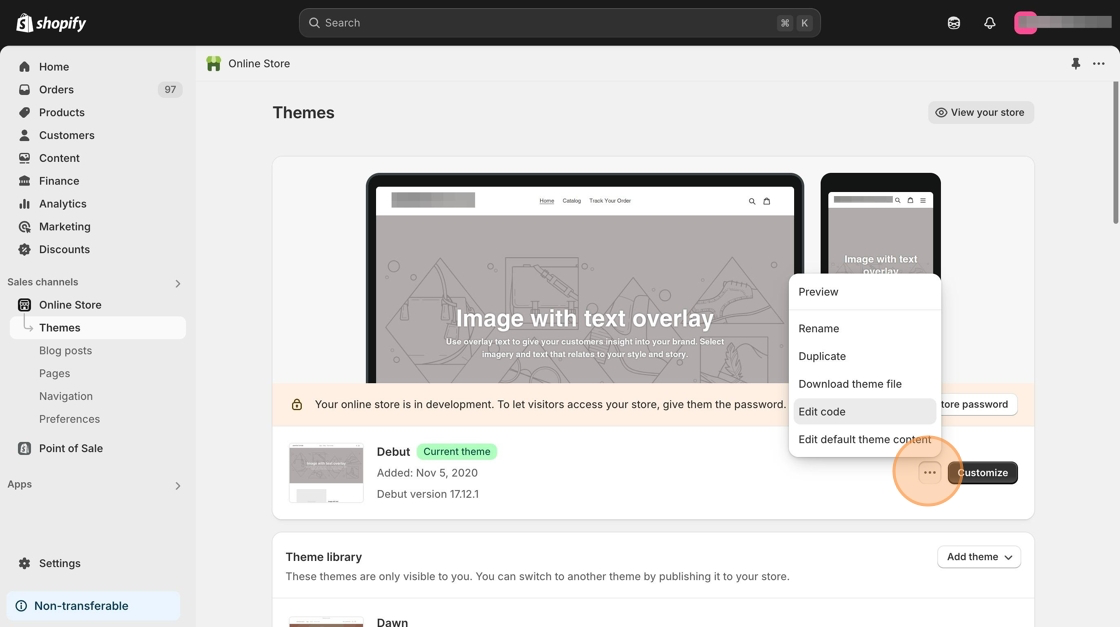
- From your Shopify admin, go to Online Store → Themes.
- Click ••• → Edit code on your active theme.
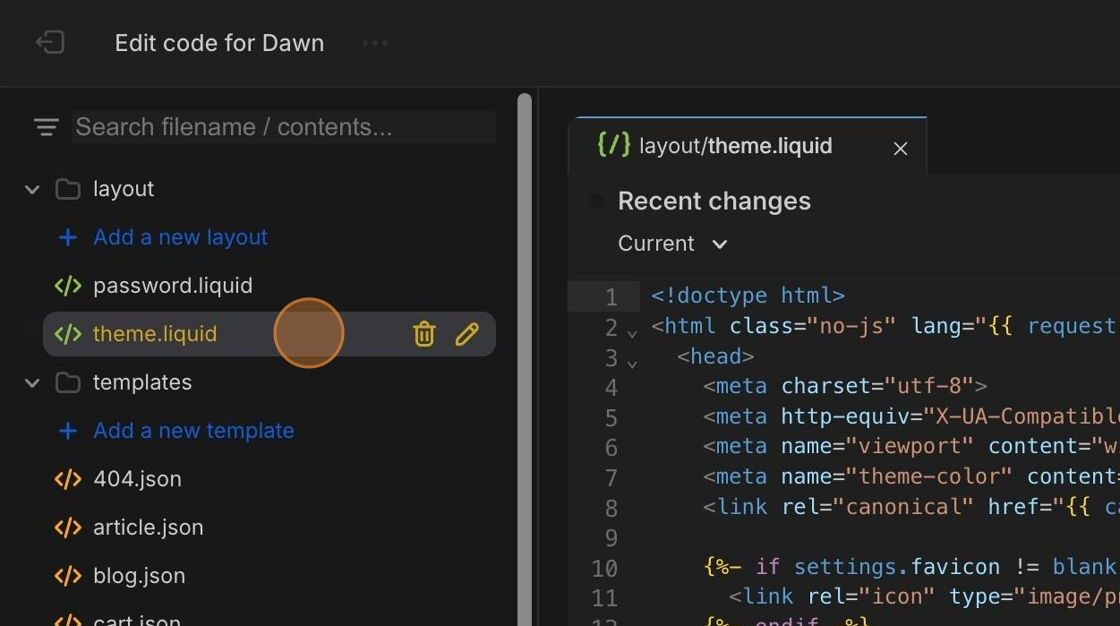
- Open Layout → theme.liquid.
- Paste the following script immediately below the opening
<head>tag.
<script src="//d1liekpayvooaz.cloudfront.net/apps/customizery/customizery.js?shop={{shop.permanent_domain}}"></script>Step-by-Step Guide
Section titled “Step-by-Step Guide”Step 1: Open your theme
Section titled “Step 1: Open your theme”From your Shopify admin:
- Go to Online Store → Themes
- Click ••• → Edit code on your active theme.
Step 2: Opentheme.liquid
Section titled “Step 2: Opentheme.liquid”In the code editor:
- Expand the Layout folder.
- Open theme.liquid.
Step 3: Add the Faster Loading Script
Section titled “Step 3: Add the Faster Loading Script”Locate the opening <head> tag.
Paste the following script immediately below it.
<script src="//d1liekpayvooaz.cloudfront.net/apps/customizery/customizery.js?shop={{shop.permanent_domain}}"></script>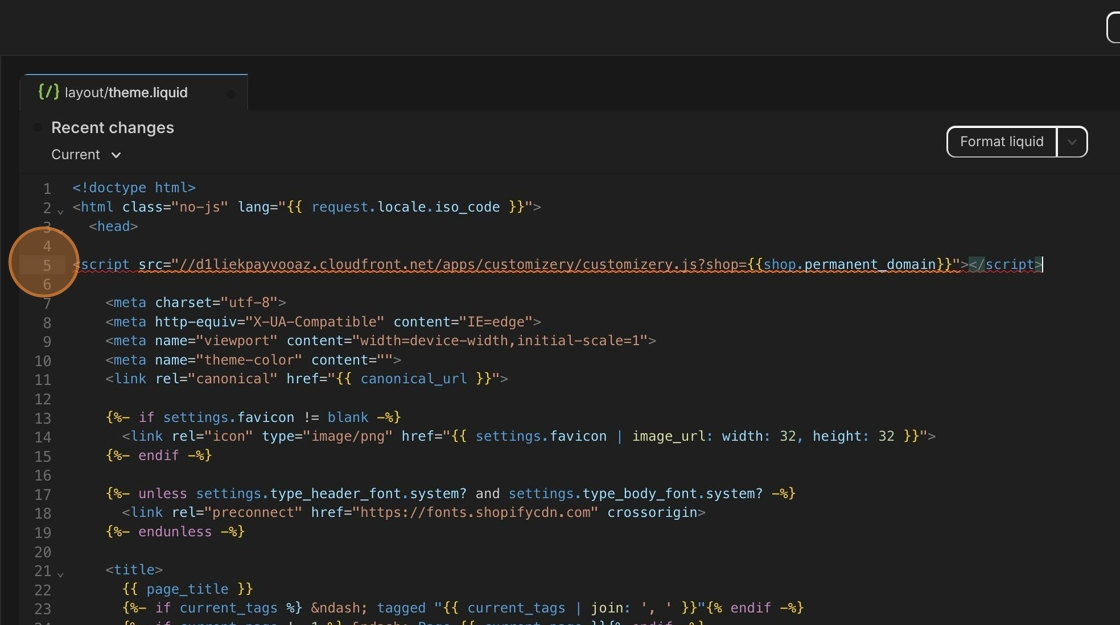
If Shopify displays a warning such as “Avoid parser blocking scripts,” you can safely ignore it.
Step 4: Save your changes
Section titled “Step 4: Save your changes”Click Save.
Why does this fix work?
Section titled “Why does this fix work?”Shopify themes don’t all load apps in the same order.
On some stores, other apps and theme scripts load before Infinite Options, causing your options to appear later than the rest of the product page.
The Faster Loading Script moves Infinite Options earlier in the page’s loading order, helping it load before most other third-party apps.
It doesn’t change:
- Your option logic
- Pricing
- Conditional logic
- Bundling behavior
It only changes when Infinite Options loads.
Confirm the Fix
Section titled “Confirm the Fix”After saving your changes:
- Refresh a product page that uses Infinite Options.
- Confirm the options appear immediately.
- Verify the page layout no longer shifts while loading.
If the delay is gone, you’re all set.
Frequently Asked Questions
Section titled “Frequently Asked Questions”Will this affect my page speed?
No. The script changes when Infinite Options loads, not how much it loads.
Can this conflict with my theme?
No. The script is designed to work with Shopify themes and only changes when Infinite Options loads.
Is this required for every store
No. Most stores don’t need this change.
It’s only recommended if Infinite Options loads noticeably later than the rest of the product page. Usually this is because of another 3rd party application.
Does this change how Infinite Options works?
No. The Faster Loading Script only changes when Infinite Options loads. It doesn’t affect option logic, pricing, conditional logic, or Native Bundling.
Need Help?
Section titled “Need Help?”If you would like help confirming whether this change is needed or want guidance applying it, contact our support team.