
Why are file details labeled "uploadery_1"?
Rename the default uploadery_1 field name that appears at checkout beside the uploaded file so order details read clearly to you and your customers.
By default, uploadery_1 is the generated field name Uploadery uses for file details. This name is displayed at checkout with the customer’s uploaded file. Follow the instructions below to change the field name value(s) to better match your file(s).
1. Starting from the Uploadery dashboard, navigate to the Option Sets tab. Then, navigate to option set.
2. Click on the arrow or the Label to open up this option set’s additional settings.
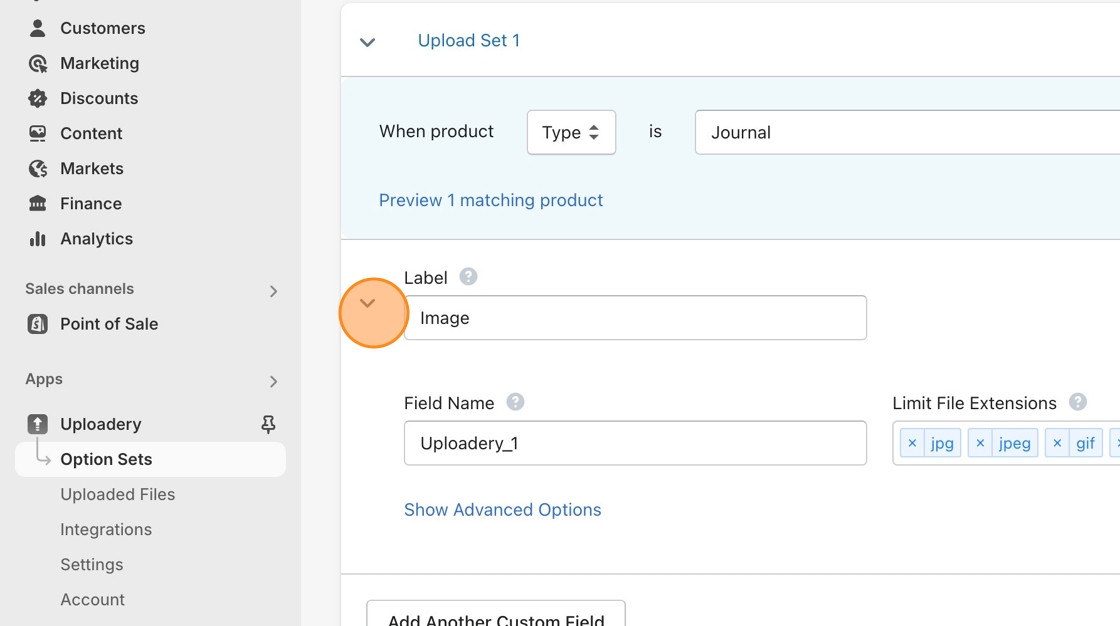
3. Change the Field Name value from uploadery_1 to something more descriptive of the file.
4. Save your changes!