> For the complete documentation index, see [llms.txt](https://docs.theshoppad.com/pagestudio/llms.txt). Markdown versions of documentation pages are available by appending `.md` to page URLs; this page is available as [Markdown](https://docs.theshoppad.com/pagestudio/troubleshooting/why-are-my-pages-so-wide.md).
# Why are my pages so wide?
Fix Page Studio pages that stretch too wide because the template skips your theme's content wrapper.
By default, the _page.studio_ template doesn't inherit your theme's code that wraps around the content of a page. This can cause issues if your theme depends on this wrapper code for the width of the page.
Follow the steps below if you'd like your _page.studio_ template to use this wrapper.
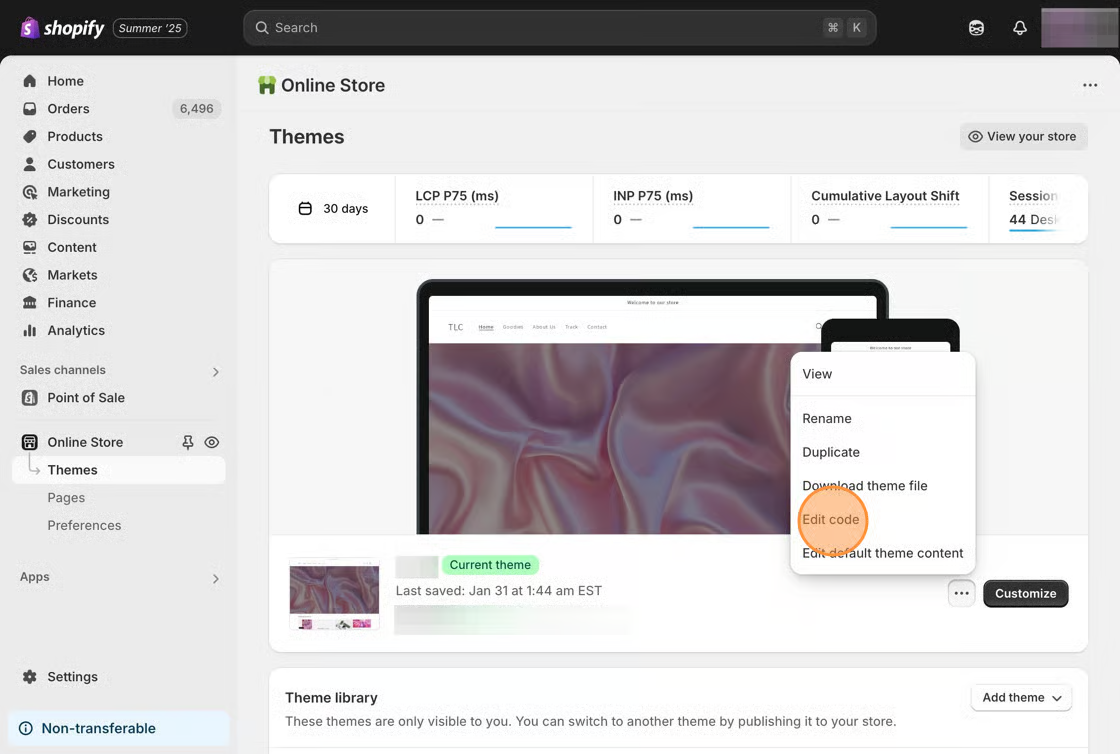
1\. Starting from your Shopify dashboard, click on **Online Store**, **Themes**, then **Edit code**.
2. On the left side, under the **Templates** heading, locate the **page.liquid** and **page.studio.liquid** files.
3. Copy all the code inside the **page.liquid** file, and replace the **page.studio.liquid** file with it.
4. Locate the following line of code in your **page.studio.liquid** file:
```html
{{ page.content }}
```
5. Replace it with the following snippet.
```html